Session Plan Scanner
Upload a photo of your hand-drawn session plan and FootballGPT detects every activity, then turns each one into an animated practice diagram.
Got a full session plan on a whiteboard or notepad? Upload the photo and FootballGPT reads the entire plan, identifies each activity (warm-up, main practice, progression, cool-down), and lists them for you. Pick the ones you want animated and each becomes a professional practice diagram with player movement, passing lines, and equipment. Save them individually or as a complete session in your Weekly Planner.
Try it
Before
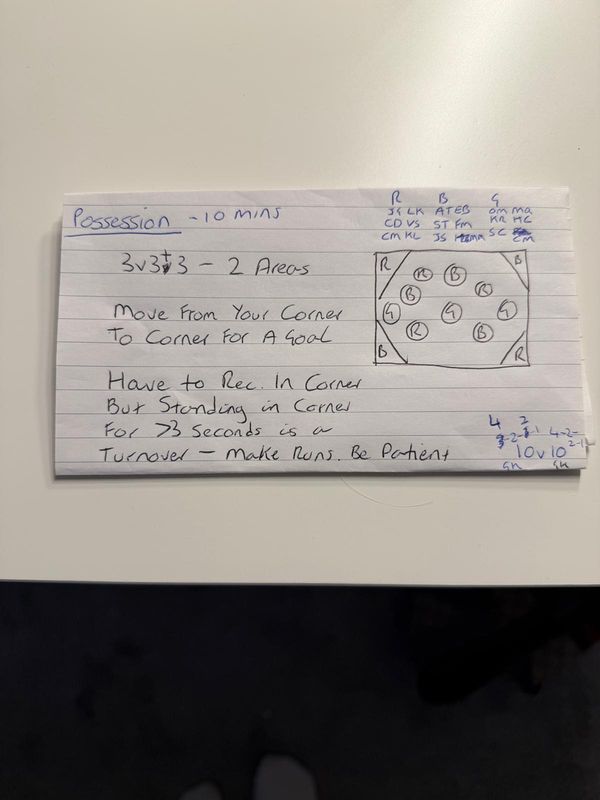
Handwritten practice card
Photo or scan of your session plan
After
Possession: Corner Goals
10 mins3v3+3 in 2 areas. Move from corner to corner to score. Receive in the corner zone, but standing for 15s is a turnover. Make runs, be patient.
What you get
- Detects multiple activities from a single session plan image
- Two-pass AI: detect activities first, then animate selected ones
- Upload photos of whiteboards, notepads, or printed plans
- Each activity becomes a standalone animated practice
- Save as individual practices or a complete session
- Practices appear in your Weekly Planner and can be shared
When to use it
- 1.Digitising a full session plan from a coaching course in one upload
- 2.Turning match-day whiteboard notes into animated practices to review
- 3.Converting a mentor's session plan into your practice library
- 4.Quickly building a week of sessions from hand-drawn plans
Related features
Plan to Animation
Upload a photo of a hand-drawn session plan or whiteboard and convert it into an animated practice diagram.
Animated Practices
Turn any coaching idea into a professional animated practice diagram. Describe what you want and FootballGPT builds it while you watch.
Session Planning
Describe what you want to work on and get a complete session plan with warm-up, main activities, progressions and cool-down.
Works with these advisors
Try Session Scanner
Try Pro for $2.99 to access this feature and everything else in FootballGPT Pro for a full week.
Try Pro for $2.99